One roster photo,
your whole month on a calendar
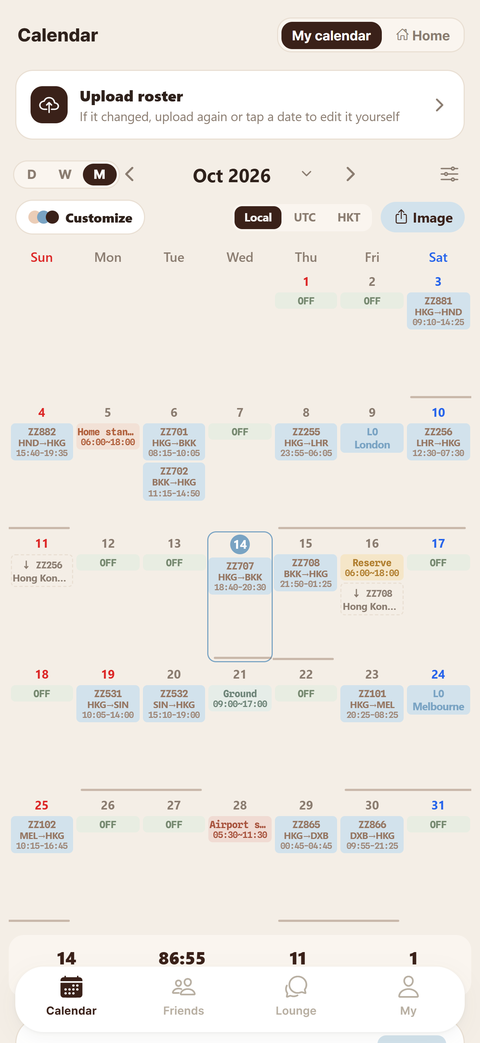
Screenshot the roster in your company app, or upload the PDF. We read flight numbers, sectors and show-up times and turn them into a calendar. We never log in to airline systems or ask for your crew portal password.
Roster reading, calendar and sharing are free
Screenshots, PDF, Excel or a calendar link — just as they are
Every airline's roster looks different, and you don't need to tidy it up. If a month spans several screenshots, pick them all at once. Or paste your crew portal's calendar link once and it updates every 3 hours. Reading your roster stays free.
- Flight numbers, airports and show-up timesSwitch between local time, UTC and your base time
- Layovers, standby, leave and trainingColour-coded by duty type, at a glance
- Roster changed? Just upload it againTap a date to fix anything that was read wrong
This month's duties on your home screen, without opening the app
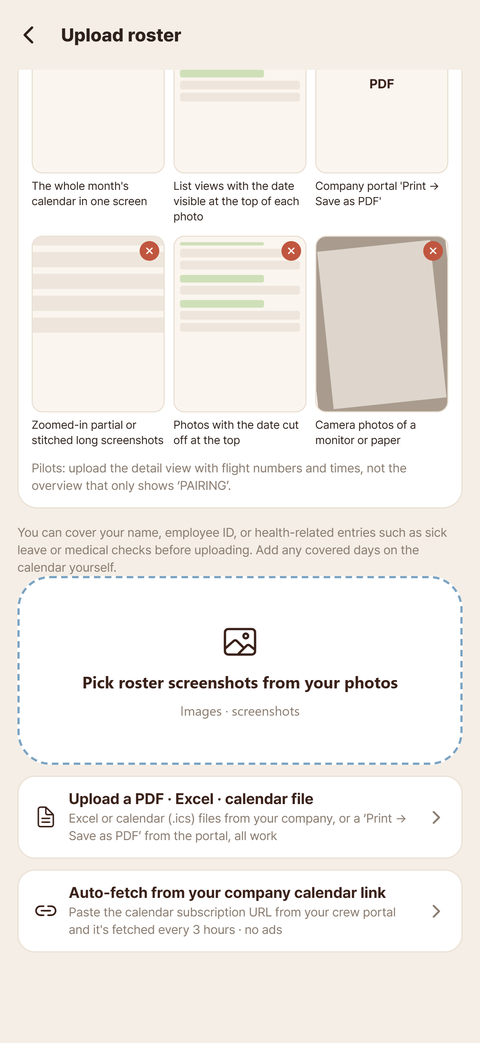
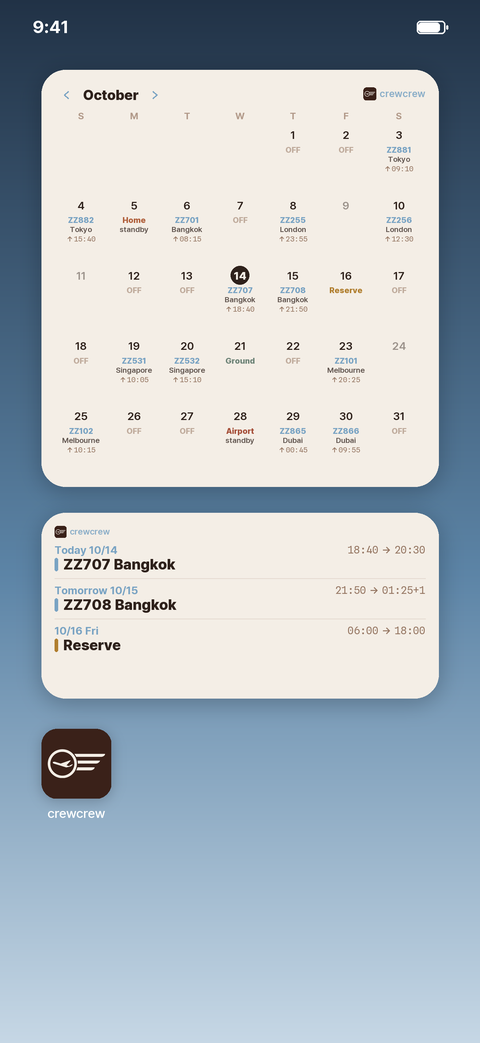
It's there as soon as you pick up your phone. The month widget shows flight numbers, cities and show-up times on each day; the list widget shows today's flight and your next ones.
- Month calendar widgetFlight number, city and show-up time on every day
- Next flights widgetToday's flight and the next two or three, with times
- Upload a roster and the widgets update straight awayOn iPhone and Android
Everyone's duties, layered on one calendar
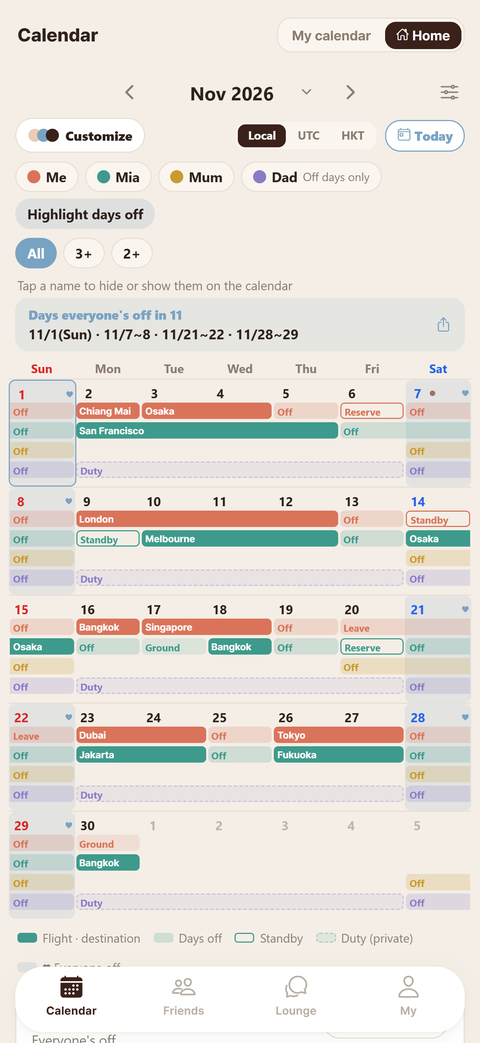
With one invite code, your family's and batchmates' duties sit on your calendar in a colour for each person. The days you're all off are picked out above the calendar.
- A colour for each personTap a name to hide or show just that person
- Days you're all off this monthShare them in one line, like “11/1 · 11/7–8 · 11/21–22”
- Family can join tooPartners and parents sign up as family and add plans, no roster needed
- Subscribe in Google Calendar or Apple CalendarYour duties show up in the calendar app you already use
- Share only your days offSet it per group: no flight numbers or routes, just when you're off
Da Nang · Crew taxi
Split a layover ride with crew in the same city that day
Once your roster is in, crewcrew already knows your layover city and date. Share a ride to the airport or into town with crew who are in the same city that day.
- Pick-up and destination on the mapYou can also leave the destination as “Decide together”
- We never show your hotelOnly the city is shown, and it disappears 3 hours after the ride
- Short in-app chat · “I've arrived”If the meeting point changes, it's noted in the chat
- New crew taxi alertsWe let crew in that city on the same day know
Find crew to travel with on your days off. Only verified crew can join, and you chat in the app under a separate nickname for each trip.
Add a photo to a day and it becomes the calendar background. Trips carry on day by day, like “Da Nang trip, day 3”.
A month of photos and flights, put together into one scrapbook page automatically.
Your notes, on the day you need them
Notes you keep for each aircraft type and airport come up automatically on the days you fly that type or to that airport.
- Aircraft and airport notesWrite it once and it comes up on each of those days
- Flight trackingTap a flight number to open it in Flightradar24
- In the air tooNo data? Your last saved roster is still there
My notes
Crew Lounge
Anonymous, among verified crew
Verify with your company email and your posts carry your airline's badge, and your own airline's lounge opens up (for supported airlines). You appear under a lounge-only nickname instead of your name, and your company email is deleted right after verification.
- Crew Lounge · My airline's loungeFlying life, dating, parenting, job moves, questions
- Polls · comments · messagesAsk whatever you're wondering about
- A verified badge for each airlineCompany email verification for supported airlines



Which crew type are you? Your flying style from saju × MBTI
Enter your date of birth and MBTI to find the princess crew type you're most like, your flying style and the crew you click with. Saju is Korean four-pillar astrology. We don't store your date of birth.
- 10 princess crew typesElsa-type, Mulan-type, Little Mermaid-type…
- Crew you click withSend it to friends and see your chemistry ranking
See my type → No app needed
Your roster becomes your logbook
Flights from the rosters you upload build up in your logbook automatically. Bring in your company flight records (Flight Log Report, ACARS photos, PDF, CSV or Excel) and we match your PIC and SIC time and your takeoffs and landings to the company originals.
Logbook · Total time
From logbooks to application forms, filled in with your hours
The most tedious part of changing jobs or applying to another airline is copying out your hours. We fill your logbook numbers into the exact forms each authority and airline uses, and give you a PDF. Draw your signature once and it goes in automatically.
Official copies for your company stamp
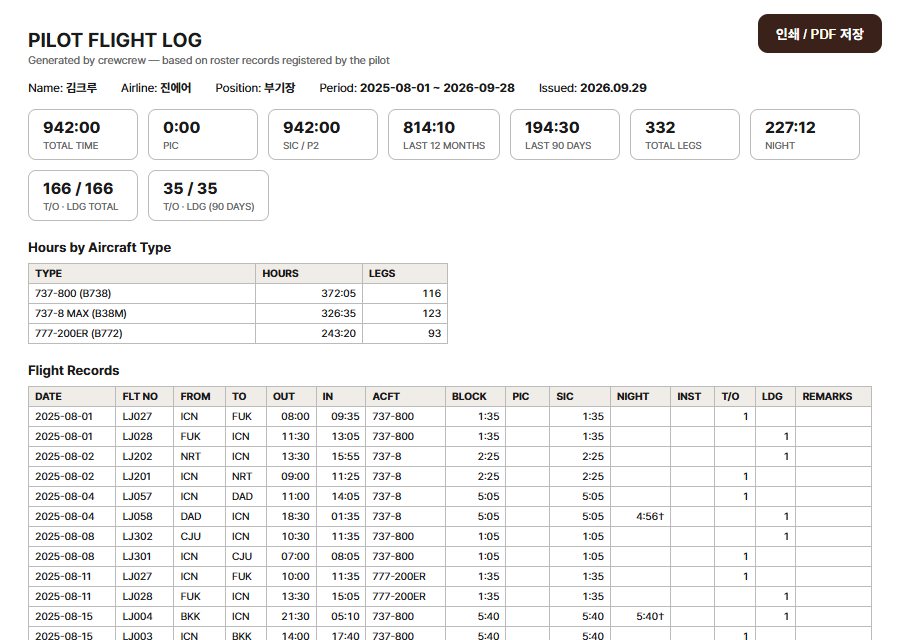
This is to certify that the flight hours recorded above are correct according to company records.
For airline applications
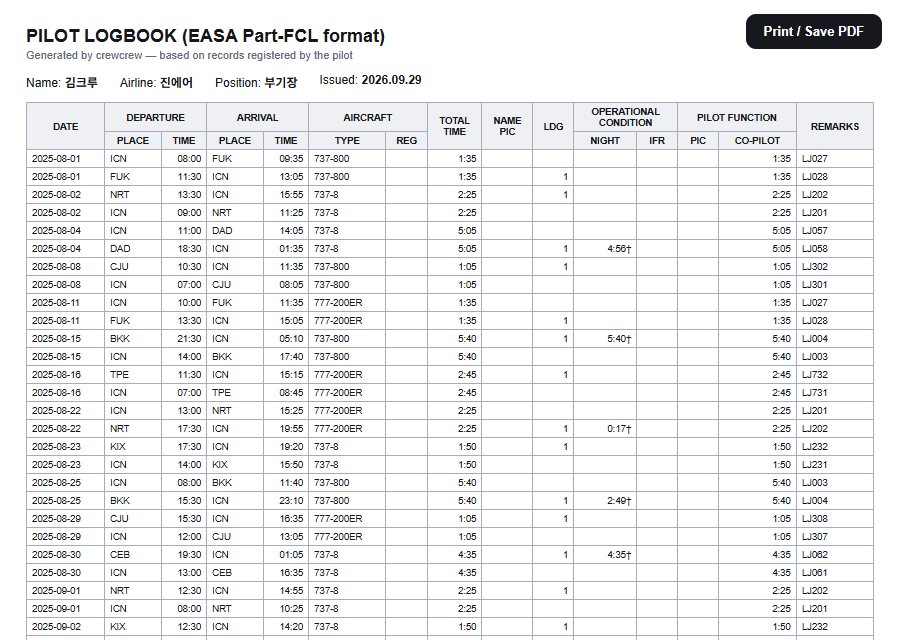
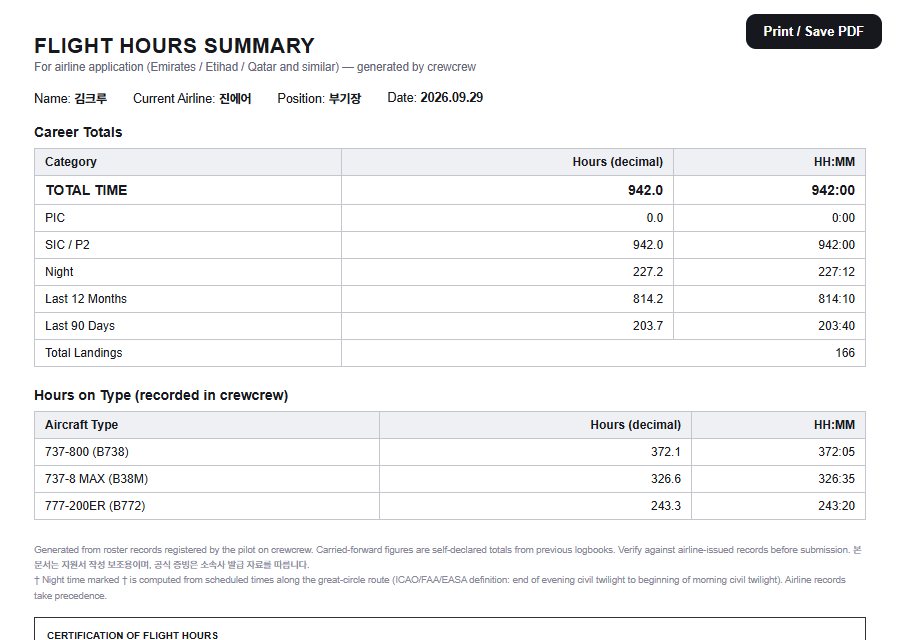
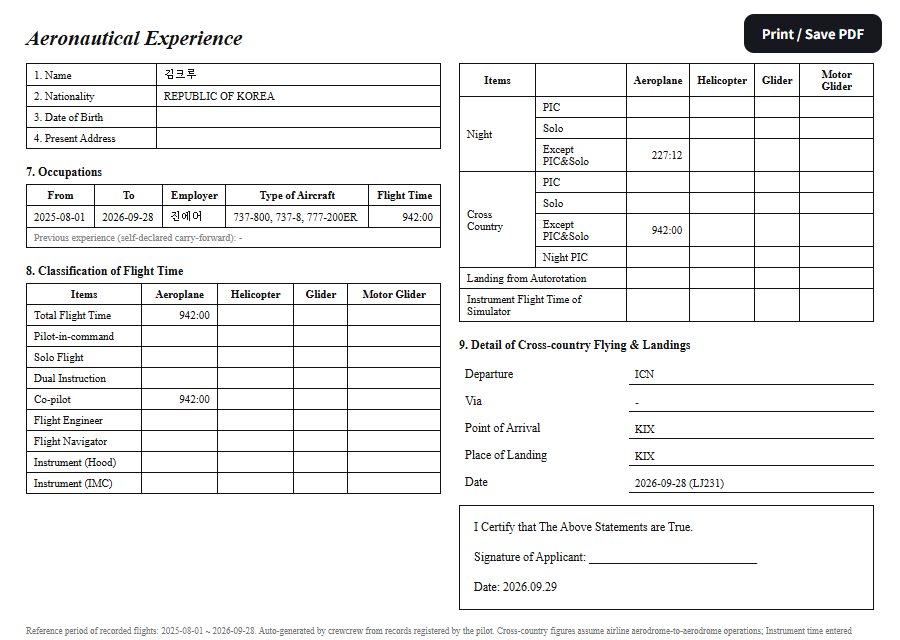
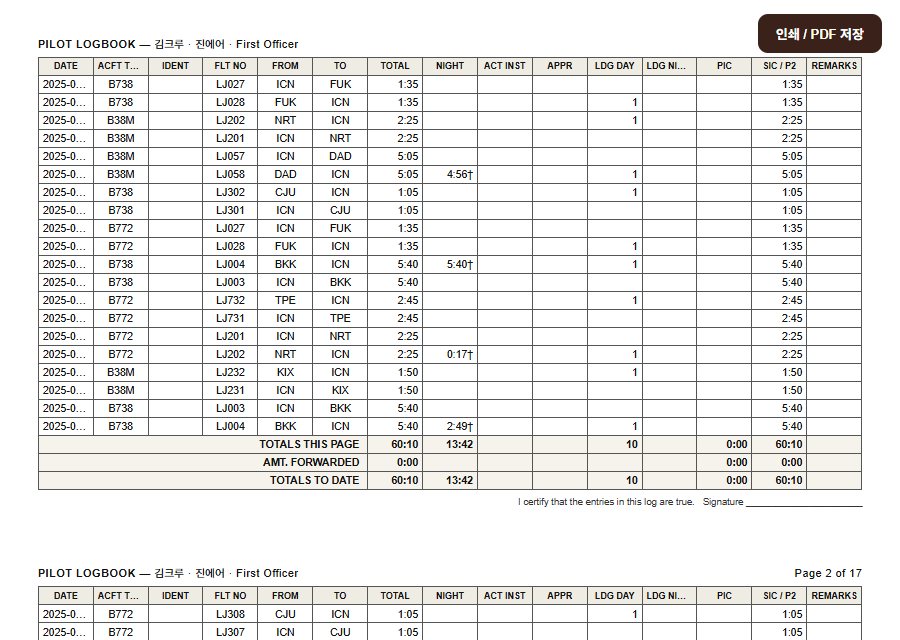
Upload an application form you've received and we'll fill in that form as it is · You can also move to another logbook app with a LogTen file or CSV.
To count as official for another airline, it needs your company's confirmation (a flight operations stamp) — bring in your company flight records first, match the numbers, then print it and get it stamped. The sample forms use a review account's records.
Pilot openings
Pilot openings — we tell you the moment they open
We check the official careers pages of 17 airlines, including Emirates, Etihad, Riyadh Air, Scoot and EVA Air, every 3 hours, and compare each posting's requirements with your logbook straight away.
- Requirements at a glanceTotal time, type, PIC, licence, English level, age — only what the posting itself says
- Compared with your recordShown straight away, like “your 1,650h ≥ 1,500h required”
- New opening alertsYou can choose to get only openings your hours qualify for
- Your rank firstFirst officers see first officer openings first
Reading your roster stays free
The calendar, sharing, crew taxi, the lounge, the automatic logbook and pilot job alerts are all free. Choose Plus when you want it prettier and easier to use. Prices vary by country and are shown in the app before you buy.
Plus
- All 9 themesOrganic, Minimal, Editorial, Stone vibe, Punch card, Pixel pop…
- Home screen widgetsMonth calendar · next flights list
- Monthly statsFlights, hours, international sectors and days off, month by month
Plus Pilot
- Everything in Plus
- Unlimited official formsICAO logbook, hours confirmation letter, EASA, Jeppesen, JCAB and Gulf application summary
- Logbook import, 30 a monthUpload company flight record files to fill in past records
- Currency expiry alertsBefore your 90-day takeoffs and landings lapse
Themes
Frequently asked questions
Do I need to log in to my airline's system?
No. crewcrew never logs in to airline systems. Take a screenshot of the roster you see in your company app or portal, or save it as a PDF, and upload it.
Which airlines' rosters can it read?
Rosters from any airline. Upload screenshots, a PDF, Excel or .ics file, or paste your crew portal's calendar link. If something is read wrong, fix that day yourself, or report it and we'll fix how that roster format is read.
Who can see a crew taxi?
Only crew in that layover city on the same day. We never show your hotel, and it disappears 3 hours after the ride.
If my roster changes, does it update automatically?
crewcrew isn't connected to your airline's system in real time. If you added your crew portal's calendar link, it updates every 3 hours. Otherwise, upload the new roster again or tap a date on the calendar to fix it yourself.
Which official forms can it make?
An ICAO-format logbook, an English flight hours confirmation letter for your flight operations department, an EASA Part-FCL logbook, a Jeppesen-style logbook, AirJapan/JCAB Aeronautical Experience, and an hours summary for applications to Gulf carriers such as Emirates, Etihad and Qatar. To count as official for another airline, it needs your company's confirmation (stamp).
Is it free?
Reading your roster, the calendar and sharing are free. Themes and widgets come with Plus, and official forms and application formats with Plus Pilot. Prices vary by country and are shown in the app before you buy.